Getting Started
As the 2025-2026 campaign cycle gears up, candidates for elected office are declaring their intention to run for public office - with those intentions, the next to-dos are fundraising and campaign strategy.
Meta’s platforms (Facebook and Instagram) and Google’s Search, YouTube, and Display properties, each host political advertisers at campaigns of all sizes: from Federal campaigns down to municipal and county campaigns. (TikTok does not allow political ads, Reddit allows only Federal campaigns, and Bluesky does not offer advertising)
The Meta and Google platforms can be intimidating due to special application requirements for political ads and instructions and user interfaces that are less than friendly.
With these considerations, getting an early start for your campaign’s advertising plan will save you time and frustration later in the election cycle.
Digital Campaign DIY
Accordingly, many political consulting firms offer comprehensive advertising services, covering strategy, content, and posting – but this full service comes at a full cost price.
Instead, campaigns can stretch their fundraising dollars by having a candidate’s volunteers, staff, or the candidate themselves handle many of these essential setup tasks themselves.
To help you do just that, this guide breaks down the key steps involved in getting your campaign ready to advertise online:
Step 1: Research
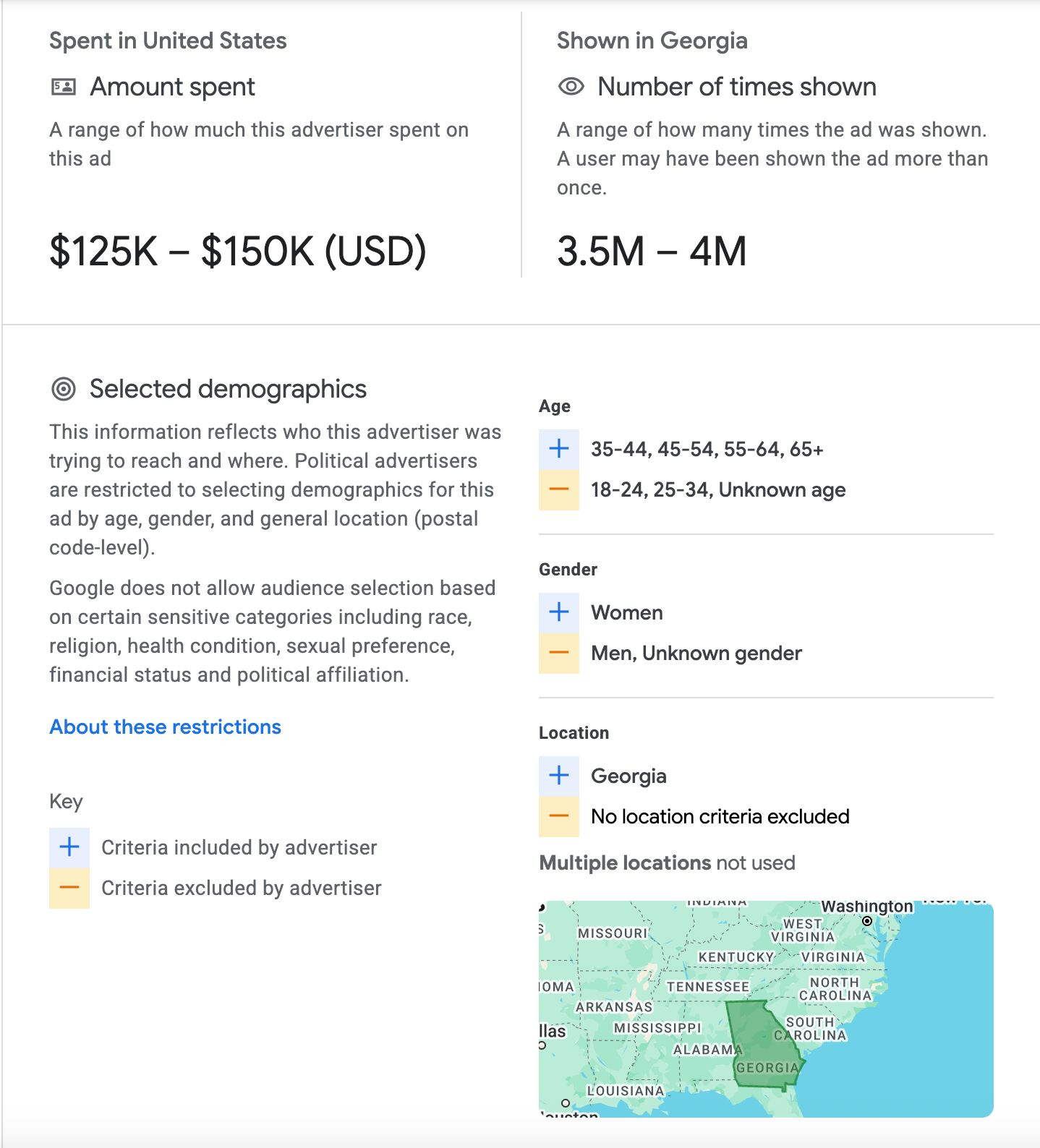
Research your opposition and other candidates who have previously run in similar races. In the United States, both Google and Meta provide libraries of past ads, and the amount of money spent on those ads.
Link to Google’s Ad Transparency Center for Political Ads
Each entry in the database shows the type of ad, the ad content, the amount of money spent, and the target locations and demographics reached by the ad.
Step 2: Complete the forms and processes needed to advertise
Both Google and Meta have special processes for political ads: both involve forms and paperwork to receive approval to purchase ads, and both have special labeling requirements during the ad purchasing process.
For both platforms, it is critically important to ensure you complete your application as soon as possible before the time you intend to purchase your ads. Google’s process can take up to 5 business days, not counting resubmissions (which can extend time), and Meta’s process can take upwards of 30 days or more.
To get started, first set up a Google Ads account at ads.google.com. When setting up the billing options for your account, make sure you select “Organization” instead of “Individual” (presuming that you have a separate legal entity that receives and expends funds for your campaign).
When you complete your setup, take note of the Google Ads Account Number. You’ll need that in a moment.
Next, apply for ads using the form at this link. Select United States, and then you’ll see an option for Google Ads and Display & Video 360 (DV360). For most campaigns, Google Ads is the best option. (DV360 is an advanced ad purchasing platform that takes a bit more work and training to utilize.)
Select “Verification for Organizations” in the form and complete the requested information. Make sure to carefully read the instructions and provide and/or upload the requested information.
You will receive a confirmation email, and then another email indicating if your application has been approved or denied.
Meta
Meta’s process is a bit more complicated than Google’s. With Google, you only need to upload identifying documents and information once. For Meta, you will need to complete a series of processes, needing to complete one process before moving on to the next.
Step-by-Step: Meta Political Advertising
- Step 1 is having an “anchor” Facebook account, or in other words, a regular plain-old Facebook account. You will use this account to log into both your personal account, and also your campaign’s Facebook Page. If you intend to also advertise on Instagram and haven’t yet created an account page for your campaign, you’ll also want to do that now.
- Then, create a separate Facebook page for your campaign. You’ll want to do this so you’re not using a personal Facebook account as your campaign account.
- Now that you have your personal account and your Facebook page, it’s time to start identity verification requirements via the instructions here.
- At this point, you’ll need to have an “Ad Disclaimer” approved. This disclaimer is a statement that accompanies every ad your campaign purchases, e.g., “Paid for by [Candidate ABC]”. To have that disclaimer approved, your campaign’s legal identity will also need to be verified. That process can be initiated here. 5.Finally, after both processes have been completed, you can proceed to purchasing ads! 🪄
Step 3: Budget, Plan, Create, and Purchase Your Ads
Once you’ve finished the above, you’re now ready to plan your advertising campaign, curate and build content for that campaign, decide your target audience, identify your target budget and success metrics, and then finally purchase those ads.
With any of these steps, if you need help navigating the digital advertising maze or assistance maximizing your budget, Civic Forge Solutions provides affordable, à la carte services for campaigns.
We assist with platform verification, ad account setup, budget planning, or content strategy, enabling your staff and volunteers to dedicate their time to your campaign’s critical tasks. We also work with a network of content producers who can turn around content at an affordable rate.
Get the expert help you need, right where you need it, and ensure that your ads are not only reaching your persuadable voters, but also driving GOTV to the victory line.
Email mailto:[email protected] to learn more and schedule a time to plan your campaign’s advertising content and strategy.